
Kids earn their screen time. You battle less.
A weekly reward chart for ages 4 to 10. Getting ready for school and getting to bed earn minutes, so when your child asks for screens, the board has the answer.
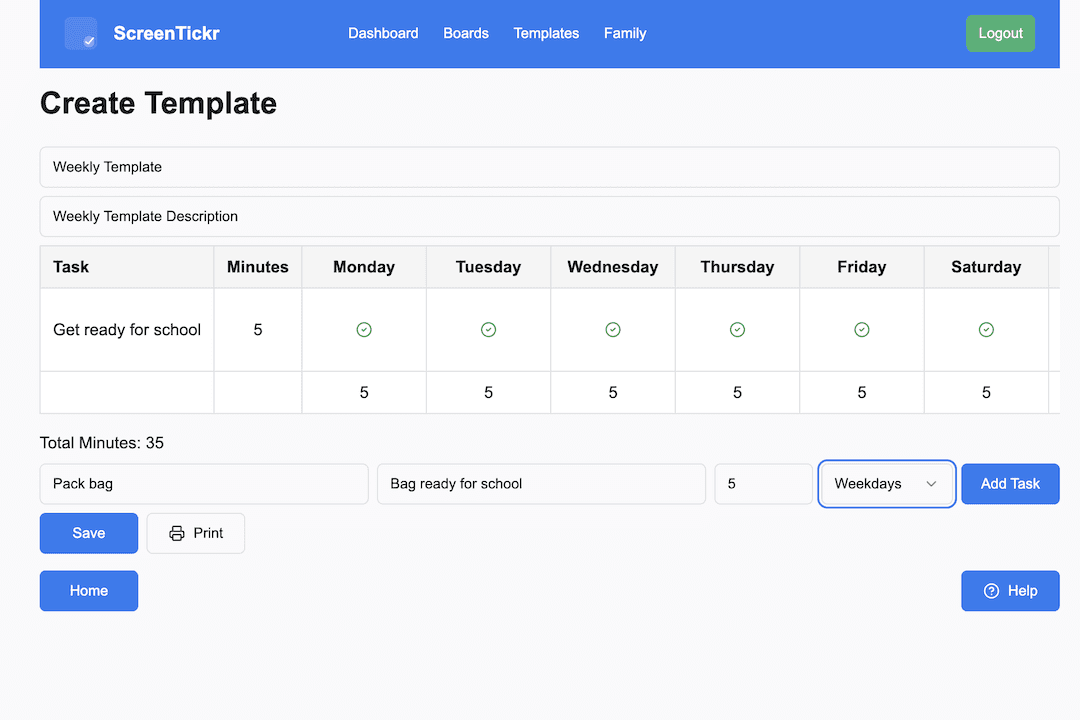
ScreenTickr is a reward chart where the currency is screen time. You pick a few regular tasks, your child earns minutes by doing them, and your device controls or a kitchen timer stop the screen when the minutes run out. Routines first, screens after.
The same arguments, every day
In the morning it's shoes, teeth and the school bag. In the evening it's pyjamas, teeth and bed. In between, there's “Can I have the iPad?” and “five more minutes”.
ScreenTickr joins those up. The things you remind your child about every day become how screen time is earned, so there are fewer reminders and fewer screen time arguments.
How ScreenTickr works
Three steps.
Pick a few regular tasks
Choose the tasks you remind your child about most, like getting ready for school or going to bed, and give each one a few minutes of screen time.
Start the week
Choose a start date and ScreenTickr turns your list into this week's board. Print it for the fridge or keep it on a tablet.
Mark it, and let the minutes add up
Tick each task off as it happens or at the end of the day. When your child asks for screens, the board shows how much they have earned.
Use it alongside the screen time controls you already have
ScreenTickr does not block apps or lock devices. It works out how much screen time your child has earned. Your device's own controls stop the screen when it runs out.
- iPad and iPhoneSet the daily limit in Apple Screen Time to the least you would give without the board. When your child spends earned minutes, they tap Ask for More Time and you approve it. Apple's shortest extension is 15 minutes, so for a shorter session your child's own timer does the stopping.
- Android and ChromebookKeep a low daily limit in Google Family Link. When your child spends earned minutes, add them as Bonus time for that day. The daily limit stays the same.
- The living-room TVNothing to set up. When your child spends earned minutes, have them set a kitchen timer for the minutes they are spending, where everyone can see it.
Try having your child set their own timer for the minutes they are spending. When it goes off, they can stop themselves before the device locks them out. That builds independence, and the device's limit stays as the backup while they learn.
Minutes build up on the board over the week, and your child chooses when to spend them. The board counts what has been earned, so keep a tally of what has been spent on the printed board or a note on the fridge. You can double-check the earned total in the app.
Your first week
Start small. Three or four tasks, 5 to 10 minutes each. Be clear about what is expected, such as doing each task without a reminder. Then keep the same tasks for a few weeks before changing anything, so your child can build a consistent routine.
Here is the board we would start a six-year-old on. It earns up to 30 minutes on a school day and 20 at the weekend. Change the minutes to suit your family, and keep the list short.
| Task | Days | Minutes |
|---|---|---|
| Get ready for school | Weekdays | 10 |
| Brush teeth | Every day | 5 |
| Pyjamas on by 7pm | Every day | 5 |
| In bed on time and stay there | Every day | 10 |
The setup wizard walks you through it: add your children, pick tasks from the suggestions, and choose a start date. Prefer paper? ScreenTickr makes it easy to print a copy of the board for the fridge.
Is ScreenTickr right for your family?
A good fit if
- Your children are roughly 4 to 10
- You decide when screens come out: a family iPad, the TV, a console
- Getting through mornings, bedtime or homework is a constant battle
- You want fewer arguments, with rules your child can see
Not the right tool if
- You need app blocking or content filtering. Use your device's parental controls for that, alongside ScreenTickr.
- Your child has their own device with no limits, and “no minutes, no screens” can't be enforced
- You want a chore chart that pays pocket money. Why we keep pocket money separate
Why parents use ScreenTickr
- Clear expectationsChildren know what's expected and what they'll earn.
- Fewer daily negotiationsScreen time becomes something earned, not debated.
- Encourages responsibilityEveryday habits build consistency over time.
- Fair and predictableEveryone knows the rules. Screen time is earned based on effort, not a parent's mood.
- See the bigger pictureReview past weeks to see progress, patterns, and improvements over time.
- Works for multiple kidsCreate separate boards tailored to each child.
A better way to think about screen time
ScreenTickr isn't about punishment. It's about helping children understand:
- Responsibility comes first
- Effort leads to reward
- Consistency builds freedom
When expectations are visible and predictable, the tension often fades.
Ready to try ScreenTickr?
Set up your first board this week. Routines first, screens after.
Try ScreenTickrFree while in early access. No payment required.